Most businesses think faster replies equal better customer experience.
They’re half right.
Speed matters—but what you say in that first reply matters even more.
Across hundreds of WhatsApp automation campaigns, one specific WhatsApp reply consistently outperforms generic responses like:
“Thanks for contacting us. We’ll get back to you shortly.”
That message kills conversations.
In this guide, you’ll discover:
-
The exact WhatsApp reply message boosting response rates
-
Why it works psychologically
-
How to automate it using OneClickAPI
-
How to scale it across sales, support, and lead generation
Let’s break it down.
Why Most WhatsApp Auto Replies Fail
Most auto replies suffer from three fatal flaws:
-
They’re impersonal
-
They don’t guide the user
-
They create waiting, not momentum
Customers don’t message businesses on WhatsApp to wait.
They message because they want instant clarity.
Generic replies feel robotic—and robots don’t convert.
The Psychology Behind High-Response WhatsApp Messages
High-performing WhatsApp auto replies trigger three psychological drivers:
1️⃣ Instant Validation
The customer feels heard immediately.
2️⃣ Clear Next Step
They know exactly what to do next.
3️⃣ Conversational Flow
It feels like a human conversation, not a ticket system.
Miss any one of these, and engagement drops.
The One WhatsApp Auto Reply That Changes Everything
Here’s the exact WhatsApp reply message businesses are using:
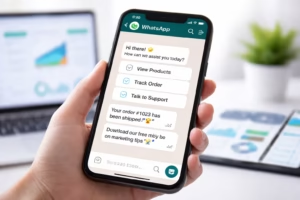
**“Hi 👋 Thanks for reaching out to [Brand Name].
To help you faster, please reply with the number below:1️⃣ Pricing
2️⃣ Product Details
3️⃣ Talk to a HumanWe’ll take it from there 🚀”**
Simple. Friendly. Directional.
And shockingly effective.
Why This WhatsApp Auto Reply Works So Well
✅ It Feels Personal
Using greetings, emojis, and brand context humanizes automation.
✅ It Reduces Friction
Customers don’t have to think—just tap a number.
✅ It Triggers Micro-Commitment
Replying “1” is easier than typing a sentence.
✅ It Segments Leads Instantly
Sales, support, and inquiries get routed automatically.
Real-World Use Cases
🛒 E-Commerce
-
1️⃣ Order Status
-
2️⃣ Product Info
-
3️⃣ Offers & Discounts
🏢 B2B / SaaS
-
1️⃣ Book a Demo
-
2️⃣ Pricing Plans
-
3️⃣ Technical Support
🏥 Healthcare
-
1️⃣ Appointments
-
2️⃣ Doctor Availability
-
3️⃣ Emergency Contact
Same structure. Different intent. Same high response rate.
How to Set Up WhatsApp Auto Reply Using OneClickAPI
Unlike the WhatsApp Business App, OneClickAPI lets you automate replies at scale.
Step-by-Step:
-
Connect your WhatsApp Business number to OneClickAPI
-
Create a WhatsApp reply workflow
-
Set trigger: Incoming Message
-
Add your auto reply message
-
Route responses based on user input
-
Assign to sales, support, or chatbot flows
No manual replies. No delays.
WhatsApp Auto Reply vs Manual Replies
| Feature | Manual Reply | WhatsApp Auto Reply |
|---|---|---|
| Speed | Slow | Instant |
| Scalability | Limited | Unlimited |
| Consistency | Varies | 100% consistent |
| Conversion Rate | Unpredictable | Optimized |
Automation wins—when done right.
Advanced WhatsApp Auto Reply Automation Ideas
-
Time-based replies (business hours vs off-hours)
-
Lead qualification via questions
-
CRM tagging automatically
-
Auto follow-ups if user doesn’t respond
-
Language-based replies
This is where WhatsApp automation becomes a revenue engine.
Best Practices for High-Converting WhatsApp Auto Replies
✔ Keep messages under 4 lines
✔ Use conversational language
✔ Always give a clear next action
✔ Avoid “We’ll get back to you”
✔ Test multiple versions
Common Mistakes to Avoid
❌ Overloading options
❌ Sounding robotic
❌ Delaying human handoff
❌ Ignoring follow-ups
Automation should feel invisible—not forced.
FAQs About WhatsApp Auto Reply
Is WhatsApp reply allowed?
Yes, when using WhatsApp Business API compliantly.
Can I use auto replies without WhatsApp Business App?
Yes—OneClickAPI enables this via API automation.
Do auto replies reduce human touch?
Only if done poorly. Smart automation increases engagement.
Final Thoughts: Automate Smart, Not Generic
The difference between ignored messages and high-converting conversations often comes down to one WhatsApp auto reply.
Use it wisely.
Automate it intelligently.
And let WhatsApp work for your business—24/7.